


What happens when my customer orders in the configurator?
The configurator is an advanced lead generator: your customer designs, sees the price and orders. You measure up, import into imos and make better use of your machines.
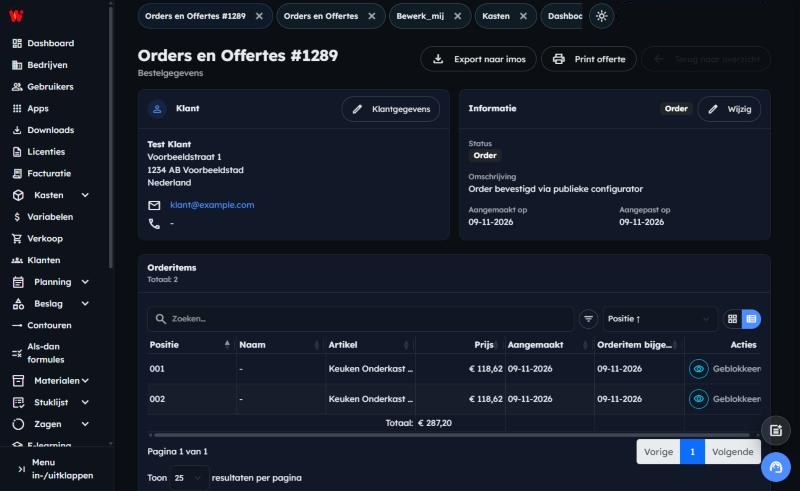
Short answer: Your customer fills in their details in the Order overview and clicks Place order. On your side, the order appears straight away under Sales, with the customer details, all the cabinets and the price. That makes the configurator a highly advanced lead generator: every order is a customer with a concrete, fully priced design that you only need to measure up and import into imos or another CAD/CAM system. In Wood Intelligence implementations, that is exactly what makes the difference: not a loose enquiry that still takes weeks of work preparation, but an order that can go straight to the machine.
Applies to
- The Wood Intelligence Plus online configurator, with and without the room planner
- Your end customer (placing the order) and you as administrator (receiving the order)
- Last checked: November 2026
Step 1: fill in the order overview
From the configurator, your customer arrives at the Order overview. At the top they see the Total incl. VAT. Under Customer details they fill in:
- Name, Email address, Street and house number, Postal code, City and Country (required)
- Phone number (optional)
Below that, under Items, are all the cabinets, each with a position number, the Quantity and the price per unit and per line, excluding and including VAT. With the pencil they go back to the configurator to adjust a cabinet; with Add item they add another cabinet.
Step 2: check the total and place the order
The total is at the bottom. If cabinets stand side by side with a continuous plinth or a worktop, those linear parts are listed separately with their size and price.
- Check the Total excl. VAT, the VAT and the Total incl. VAT.
- Click Place order. Not ready yet? With Save for later, your customer saves the design.
- Your customer sees Thank you for your order! with their order number.
Step 3: receive the order
The order appears immediately in Wood Intelligence Plus under Sales → Orders and Quotations, with the status Order and the description Order confirmed via public configurator. Your company's administrators receive an email notification for each new order. It contains no customer details; you read those in the admin area.
Open the order to see:
- Customer: name, address, email address and phone number.
- Information: status, description and dates. With Change you adjust the status.
- Order items: each cabinet with position, item and price. The cabinets are set to Blocked: what the customer ordered can no longer change unnoticed.
Step 4: contact your customer
From the moment they order, they are your customer. You have their name, address, email address and possibly their phone number, and you contact them yourself to:
- discuss measuring on site;
- arrange delivery;
- go through the delivery time.
The price is already fixed. If something significant changes after measuring up, you adjust the order yourself in the 3D Designer with Connect or Pro: set it back to Concept via Change. Behind the configurator is a complete cabinet design tool, so in principle you can still change everything: dimensions, layout, materials and hardware. The price is recalculated as you go.
Step 5: on to production and imos
Once the order is completely right, you continue from the order:
- Print quote: a neat quote or order confirmation for your customer.
- Export to imos (Connect and Pro): all variables and imos-specific data of the cabinets go via the imos iX Sales Import Manager to your imos iX CAD/CAM system, for drawings, cutting lists and CNC.
- Start production: the order gets the status production, so everyone can see it is in progress.
That way the configurator does more than just sell: the same order goes on to work preparation without retyping.
Not working with imos? The export to imos is included as standard, but in principle we can import the orders into any CAD/CAM software. Ask about it during a demonstration and we'll look together at which integration suits your software and machines.
Why no online payment?
The configurator deliberately has no payment system as standard. Bespoke work deserves a personal finish by the interior manufacturer: there usually still needs to be measuring on site, and something may change at the last moment. A direct payment doesn't fit that. You agree the deposit and payment with your customer yourself.
Would you still like your customer to pay online straight away? That only makes sense for furniture that no longer needs measuring up, such as a freestanding cabinet or a TV unit. Get in touch with us: we're open to integrating a payment system as a custom solution.
What does it cost?
With Start, you pay nothing to use the configurator. Only when an order comes in through your website, and you therefore receive the customer details, do we charge a commission. No order, no costs. With Connect or Pro, you pay a monthly fee and a lower commission. The amounts are in the pricing further down.
More than a configurator: a lead generator
An ordinary contact form produces a question. The configurator produces a customer who has already designed their cabinet, seen the price and left their details. A lead like that is warm: you no longer need to convince, only to fine-tune. That's why the configurator fits on any interior manufacturer's website, via a link, an iFrame or a button.
Make better use of your machines
If you work a single day shift, your CNC machine stands idle at night and at the weekend. A large part of its capacity goes unused. Orders from the configurator need little work preparation: you check them, measure up and import them into imos. That makes it easier to fill that capacity, without extra drawing work, and you run a higher margin on the same machine.
Why this way?
With an ordinary enquiry, the work only starts after the first contact: requesting dimensions, drawing, calculating and preparing a quote. Through the configurator, dimensions, materials, colours and price are already fixed at the moment of ordering. Because the cabinet is built according to your own design and cost price, the order is technically complete straight away. So you start the conversation with your customer with a concrete design, and the order then goes on to imos and production without retyping.
Note
- Can't see an order in the list? Drafts without a customer are hidden by default. Click Show anonymous drafts to see them.
- Confirmed orders are blocked. If you want to change something after measuring up, first set the order back to Concept and check the price after making your changes.
- Only export to imos once the order is final. That way, what is produced matches what you agreed with your customer.
Want to know how configurator orders fit into your production and imos? Through Get to know us, you can schedule a conversation with Wood Intelligence.
What does the configurator cost?
You choose one of three plans. The more orders that come in through your website, the sooner a plan with a lower commission pays off. All amounts exclude VAT.
Start
€0
per month
Get started without fixed costs
5% commission per order
- Configurator on your own website, in 3D
- Your own cabinets, shapes, questions and materials in the cabinet editor
- 3D room planner with accessories
- Your customer saves a design and continues later
- Quotes and orders, with a notification for each new order
- Customer details as soon as your customer places an order
Connect
€149
per month
Connected to your customer and your production
3% commission per order
Everything in Start, plus:
- Customer details of saved designs
- Customer changes in the 3D Designer: adjust and modify a received order
- Export to imos iX Sales Import Manager
- Wood Intelligence Plus
Pro
€349
per month
From design straight to drawing and machine
2% commission per order
Everything in Connect, plus:
- Automatic drawings of your projects, with sections and elevations
- Control of your CNC machine with downloadable CNC files
- Custom integrations, such as ERP, CAD/CAM or online payment (on quotation)
The commission applies to each order your customer places through the configurator. Every plan includes one user; an extra user costs €9.99 per month. A training of at least one day is always part of getting started. You see the customer details of a saved design in Connect and Pro; in Start you see them as soon as the customer places an order themselves.
Frequently asked questions
What details does my customer need to fill in to order?
Name, email address, street and house number, postal code, city and country. The phone number is optional.
Where do I find the orders from the configurator?
In Wood Intelligence Plus under Sales → Orders and Quotations. An order placed through the configurator has the description Order confirmed via public configurator.
Do I get a notification when an order comes in?
Yes, in every plan. Your company's administrators receive an email when an order is first confirmed. It deliberately contains no customer details; you read those in the order.
Can I send a configurator order to imos iX or other CAD/CAM software?
Yes, with Configurator Connect or Pro. Open the order and click Export to imos; the order goes to the imos iX Sales Import Manager. Working with other CAD/CAM software? In principle we can import into any CAD/CAM package. Ask about it during a demonstration.
Can my customer pay online straight away?
No, deliberately not. Bespoke work is usually followed by measuring on site and sometimes a change. That's why you agree the payment with your customer yourself.
What does the configurator cost?
That depends on your plan: Start without a monthly fee, Connect or Pro with a monthly fee and a lower commission. The amounts and differences are in the pricing above. Every plan includes one user, and a training of at least one day is part of getting started.
Can I still change an order after measuring up?
Yes, with Configurator Connect or Pro. Set the order back to Concept via Change and adjust it in the 3D Designer. You can change everything, because behind the configurator is a complete cabinet design tool. Check the price afterwards.
Why do you call the configurator a lead generator?
Because every order gives you a customer with a designed, fully priced cabinet and complete contact details. You no longer need to convince, only to measure up and fine-tune.
Can I still have a payment system integrated?
Yes, as a custom solution. It is only suitable for furniture that no longer needs measuring up. Contact Wood Intelligence to discuss the options.
Further reading
- How does my customer furnish a room with the configurator?
- How does the configurator work for a single cabinet?
- How do I prepare a cabinet for the online configurator?
More than one solution
Almost every question in this knowledge base has more than one solution. The best fit depends on your workflow, machinery and integrations. Not sure which applies to you, or are you using software we don't (yet) support? Feel free to email Wood Intelligence. We're happy to think along with any challenge.
imos is a brand of imos AG; Wood Intelligence is an independent consultancy.