


3D furniture configurator for interior manufacturers
Let customers design their own custom cabinets on your website. Dimensions, materials and sales prices are calculated instantly. You receive the order with parts list, cutting list and production data, ready for your work preparation and without redrawing the cabinet.
- 10 minto adapt and publish an existing cabinet concept
- No cure, no paywith Start no monthly fee, only commission on orders through your website
- 1 dayof training, then you work independently
One configurator, from customer to production
A good-looking 3D model is only the beginning. The same design produces the sales price, the parts list and the production data. Your work preparation never has to redraw the order.
For you as administrator
You design the cabinet once in the designer and decide what your customer may choose.
How you build a cabinetFor your customer
Your customer designs easily within your limits, and it is still true custom work: from cabinet dimensions to the whole room.
What your customer seesFor the manufacturer
From a complete parts list and cutting list to material requirements, purchase lists and export to imos iX.
How it reaches your workshopBuild your own 3D cabinet configurator without programming
A custom cabinet is more than a few panels. Our 3D designer takes care of materials, connections and construction. You decide which parts and options you use.
Every part technically worked out
You work with technically detailed standard parts. Top surface, bottom surface, core material or a melamine-faced board, edge banding on four sides, connections to the neighbouring panels: the designer already knows. Tick a box to use the part.
Build your cabinet from existing parts
Sides, bottom, top, back, adjustable feet and door. Every tick is a part, with material, edge banding and connection already filled in.
Adjust dimensions and fronts with ease
Make the cabinet wider and taller. Panels, edge banding and price update with it. A simple menu turns the door into a drop-down flap, a double door or sliding doors.
From flap to double doors
Turn a flap into double doors with handles in a few clicks. The construction and the matching parts adapt automatically. You choose a sloped side or a rounded corner the same way.
Decide what your customer may choose
Set the limits your customer designs within: minimum and maximum dimensions, decors and front types. Is everything right under Ready to publish? Then put the cabinet online with a link, iFrame or button. No programmer needed.
Software for custom cabinets, including complex furniture
From simple cabinets to complex custom constructions: you only use the features you need.
Any shape
Sloped, rounded, with a cut-out or drawn entirely by yourself. You choose the shape and the cabinet adapts.
Connectors and hardware
You set up connectors and hardware once, with machining and price. From then on they are included in every cabinet.
Over 9,000 decors
Decors from 22 suppliers, with real board thicknesses. You decide which ones your customer sees.
Explore the libraryYou manage everything yourself. No programmer needed.
Concepts, materials and prices in one management environment. After one day of training you publish new cabinet concepts in minutes.
Online cabinet configurator on your own website
Easy to design, true custom work. This is what your customer sees on your website, or on a private-label website of your own. Your customer chooses the dimensions, materials and finish, within the limits you set. The configurator shows the 3D model and the price instantly, on desktop, tablet and mobile, in Dutch, English, French and German.
Customer picks a concept
You put your own cabinet concepts online. The customer picks one and sees it in 3D right away, with doors that really open.
Dimensions to the millimetre
Width, height and depth within the limits you set. The cabinet and the price update live.
Real materials, real thicknesses
Decors and board thicknesses come from the supplier data. What the customer sees, you can actually supply. Try it yourself with the decors shown.
A complete parts list, automatically
After the order, the cabinet breaks down into parts: dimensions, edge banding and connections. Automatically.
Straight to production
The cutting list comes from the same panels you just saw. Labels and CAD/CAM export are ready.
From cabinet to complete room
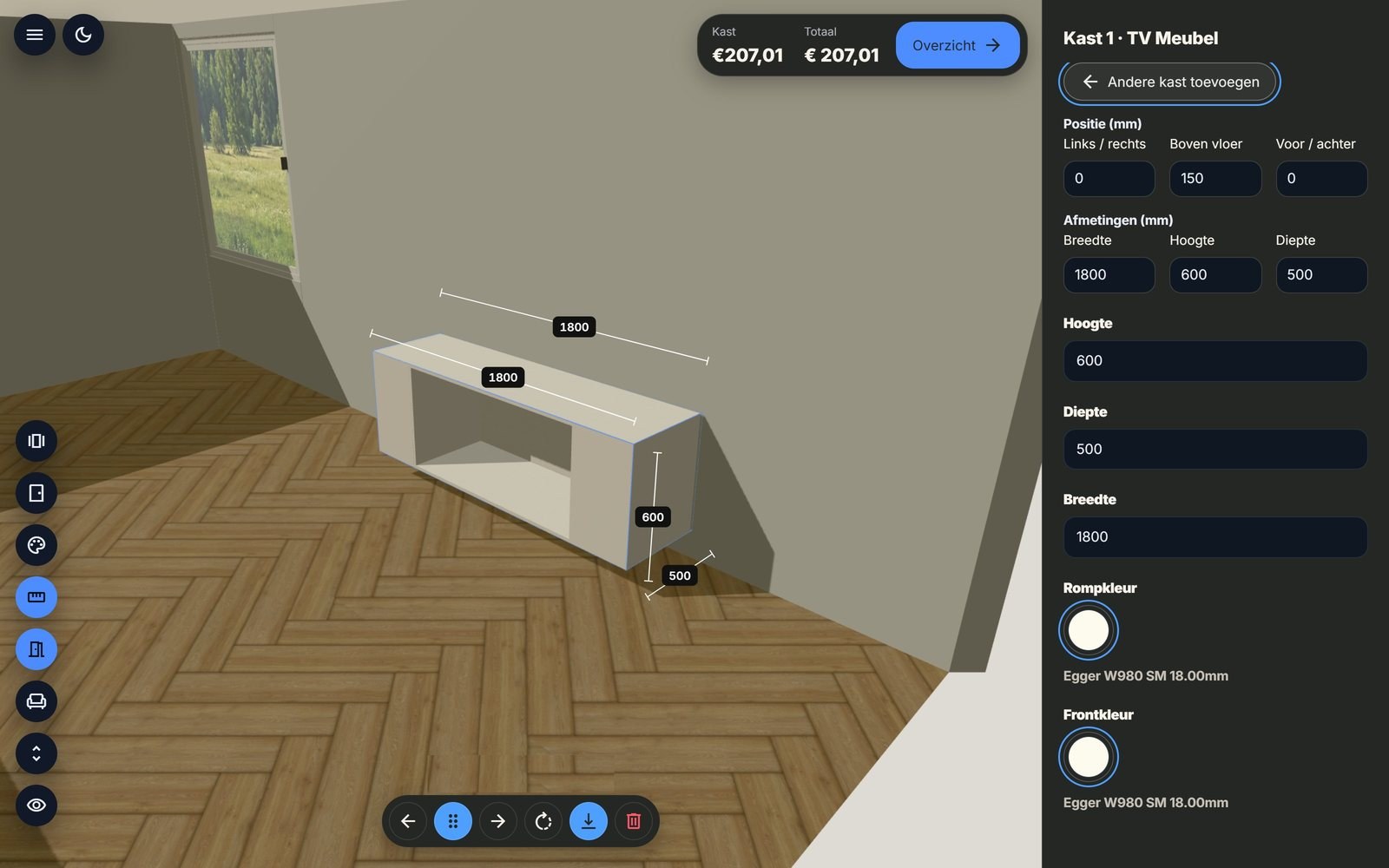
With the 3D room planner, your customer places the cabinet in their own room and sees before ordering whether everything fits. Discover how the 3D room planner works.
Your customer places the cabinet in the room
With the 3D room planner, your customer recreates their own room. Floor colour, windows and doors are chosen in a few clicks.
The room just like at home
Your customer can easily add structural details too, such as a niche, a corner or a sloped wall.
Placing cabinets in the room
A second cabinet slides right next to it. With the dimension lines, your customer checks that everything fits.
Worktop and plinth to length
A continuous worktop across both cabinets and a plinth underneath. These linear parts follow the cabinets: length, cutting list and price are calculated automatically.
Furnish and view
Accessories complete the picture. Your customer sees a photorealistic end result before anything is ordered.
See how your own cabinets go online?
In a free demo we show how administrator, customer and workshop work with the same cabinet.
Free and without obligation · 60 minutes via Microsoft Teams · Focused on your own business
Automated work preparation for interior manufacturing
Your customer configures the cabinet and places the order. You receive all the data, check the dimensions and arrange delivery; online payment is possible through a custom integration if you wish. The same design produces the parts list, the price, the sheet layout, the cutting list and the purchase list. Nothing needs to be retyped.
A complete parts list, automatically
Every panel with material, surfaces, edge banding and dimensions. Plus connectors, hardware and other purchased parts. When a dimension changes, the list changes with it.
Automatic costing of custom furniture
You enter your purchase prices and costing factors once: per piece, metre, m² or m³, for a panel, a cabinet or the whole order, with your own mark-up. From then on the system calculates what each custom cabinet should cost, while your customer is choosing.
Sheet optimisation and material calculation
The system places the parts on the board, with saw kerf, edge trim and grain direction. The optimisation plan shows what you need per material. Calculate per m², per full board or by actual usage.
This is how you cost and plan production. You cut with your own saw software, based on the CSV.
Export to imos, cutting lists and purchase lists
Every panel gets a label. The cutting list goes to your saw software as a CSV, or to imos iX in one click. Purchased parts such as hardware, connectors and adjustable feet appear on a purchase list, and the costing provides the minutes for your planning.
See a production order up close?
We open an order from the configurator with parts list, cutting list, sheet layout and export to imos.
Free and without obligation · 60 minutes via Microsoft Teams · Focused on your own business
Why interior manufacturers choose a 3D configurator
Four reasons to put your custom work online.
Custom work can be configured too
“I make custom work, you can't configure that.” Yet you can. Your customer designs it and you receive complete production orders, right when skilled craftspeople and work planners are scarce.
Customers who have already configured their cabinet
A contact form produces a question. The configurator produces a customer who has already configured the cabinet and knows the price. All that is left is to measure up and agree the details.
More production capacity with less preparation
Qualified work planners are scarce. Orders from the configurator fill your capacity without adding many hours of work preparation. You check them, measure up and import them into imos in one click. That way you fill idle hours on the same machine.
Supplier to the interior trade
Open the configurator to fellow interior manufacturers as well. They configure their own cabinets and you receive simple orders that are ready for production.
How to get started with the 3D configurator
You already have your own cabinet models. In four steps they are online, without a programmer.
1. Introduction
A free one-hour online session. We look at your cabinets and your website.
2. Kick-off day
We start together: one day of training and set-up with your staff, so your first cabinets are online properly straight away. After that you continue independently.
Plans and kick-off day3. Your first cabinet concept
You set up an existing cabinet model in the designer, or adapt a copy of a sample cabinet, and decide what your customer may choose.
How to prepare a cabinet4. Publish
With a link, iFrame or button the configurator is on your website. Orders come straight to you.
Three plans, commission only when you get an order
We want to make selling custom work online simple and attractive for interior manufacturers. With Start you pay no monthly fee: no order, no costs. As more orders come in through your website, Connect or Pro with a lower commission soon pays off. All amounts exclude VAT.
Start
€0
per month
Get started without fixed costs
5% commission per order
- Configurator on your own website, in 3D
- Your own cabinets, shapes, questions and materials in the cabinet editor
- 3D room planner with accessories
- Your customer saves a design and continues later
- Quotes and orders, with a notification for each new order
- Customer details as soon as your customer places an order
Connect
€149
per month
Connected to your customer and your production
3% commission per order
Everything in Start, plus:
- Customer details of saved designs
- Customer changes in the 3D Designer: adjust and modify a received order
- Export to imos iX Sales Import Manager
- Wood Intelligence Plus
Pro
€349
per month
From design straight to drawing and machine
2% commission per order
Everything in Connect, plus:
- Automatic drawings of your projects, with sections and elevations
- Control of your CNC machine with downloadable CNC files
- Custom integrations, such as ERP, CAD/CAM or online payment (on quotation)
The commission applies to each order your customer places through the configurator. Every plan includes one user; an extra user costs €9.99 per month. Training of at least one day and installation are one-off, at our standard rates. This often qualifies for a subsidy. Feel free to ask about the terms.
What does this mean for your business?
Together we work out what training, installation and any integrations mean for you.
Free and without obligation · 60 minutes via Microsoft Teams · Focused on your own business
Why is the configurator a lead generator?
Every order brings you a customer with a designed, fully priced cabinet and complete contact details. All that is left is to measure up and agree the details. Read how an order comes in.
Can my customer pay online straight away?
Not by default, and that is deliberate: custom work usually still needs measuring on site. For furniture that does not need measuring, we can connect a payment system as a custom integration on request. Please contact us for this.
Can I connect the configurator to my ERP or CAD/CAM?
Yes. The configurator can be connected to ERP and CAD/CAM software for an automatic order flow. Our product specialists give you tailored advice.
Do I need to be able to program?
No. You add the cabinet configurator to your website as a plug-in, with a link, iFrame or button, and add concepts yourself, without a programmer.
Can I see the configurator first?
Yes. In a free one-hour online introduction via Microsoft Teams, we show the configurator live and answer your questions.
Want to know more? Read it in the knowledge base
Panel and wall materials from the major manufacturers
From melamine and HPL to real veneer: decors with texture, structure and grain, ready to link to your own codes and edge banding.

Egger
426 decors, including Smoothtouch Matt, PerfectSense Topmatt, Premium Matt and Gloss, Feelwood, Deepskin, Omnipore and Mineral. Also as a ready-made package.

Pfleiderer
594 decors, including Sandpearl, Top Velvet, Miniperl, Natural Wood, Ceramo and the XTreme line. Also as a ready-made package.

Unilin
234 decors, including Topmat, Soft Pearl, Supermat, Master Oak, Subtle Wood and Veneer Wood. Also as a ready-made package.

Cleaf (Decolegno)
1,359 decors in over 60 structures, including Ares, Traccia, Ovatta, Millennium, Primofiore, Fiocco, Matrix and Nadir.

Trespa
132 decors in HPL and compact laminate, for fronts, worktops and walls that need to take a knock.

Fenix
37 colours of super-matt, anti-fingerprint HPL. Also as a ready-made package.

Shinnoki
18 decors of prefinished veneer, matt finished and ready to use.

Querkus
18 decors of solid wood panels.
Infinite Wood
17 veneer decors.
Nuxe
9 veneer decors.

Decospan
4 veneer decors, from the maker of Shinnoki.
Worktops, solid surface and lacquer colours
Ceramics, composite stone and solid surface for worktops and walls, and lacquer colours in matt, satin and high gloss.
Silestone
77 decors in Polished, Suede and Volcano.
Dekton
60 decors of ultracompact surface, heat and scratch resistant.

Inalco
28 decors of large-format ceramics with a natural stone look.
Ascale
47 ceramic decors for worktops and walls.

Diresco
37 colours, each in Anticato, Poli and Velvet. Also as a ready-made package.

Krion
101 colours of seamless solid surface.

Durasein
46 solid surface colours.

NCS
1,721 colours, each in matt, satin and high gloss, with render principles and surfaces.

RAL
210 colours, each in matt, satin and high gloss, with render principles and surfaces.

Ceta Bever
29 colours on wood texture.
Book your free demonstration
We show the 3D configurator live with cabinets that suit your business. Feel free to call us too: +31 85 200 7970.
Free and without obligation · 60 minutes via Microsoft Teams · Focused on your own business